

To record a sermon on your iPhone, open the built-in Voice Memos app and tap the red button. It's free, it takes one tap, and it captures the audio and nothing else. If you want a recording you'll actually use later, record with Sermon Keeper instead: it captures the audio, lets you drop timestamped notes as the pastor speaks, and turns the whole thing into a searchable transcript with a summary.
Below is the step-by-step for both, plus the small mistakes that quietly ruin most sermon recordings. Recording the sermon sounds simple, and the recording part genuinely is. The hard part is everything after: finding the one line you wanted, remembering which passage the pastor built the message on, actually revisiting it before next Sunday. How you record decides how painful that is.
First: is it okay to record?
Almost always, yes. Recording a service you're attending, for your own use, is legal in most of the US and welcomed by most churches. Two things are worth ten seconds of thought: a handful of states have stricter consent rules, and individual churches set their own policy. Some sell official recordings, some ask you not to film. A quiet word with a pastor or usher settles it, and we wrote a full breakdown in is it legal to record a church sermon if you want the details.
Method 1: Voice Memos, free and already on your phone
Voice Memos ships on every iPhone, so there's nothing to install. Here's the whole process:
- Open Voice Memos. Swipe down and search "Voice Memos" if you can't find it.
- Sit near the sound. A spot toward the front, or near a speaker, makes a bigger difference than any setting.
- Turn on Airplane Mode, or at least Do Not Disturb, so a call or notification can't interrupt the recording.
- Tap the red button a moment before the sermon starts, so you catch the opening line.
- Tap stop, then rename it. "John 3, Grace" beats "New Recording 47." It syncs to your other Apple devices through iCloud.
Voice Memos is perfect when all you need is the audio. What it won't do is mark the moment something lands, pull out the key points, or turn speech into text. You get one long file, and revisiting a 45-minute recording to find one sentence is its own small chore.
Method 2: Sermon Keeper, which records, notes, and transcribes in one
Sermon Keeper is built for exactly this moment. Instead of choosing between listening and writing, you do both, and the app ties them together:
- Tap record when the sermon begins.
- Drop a note whenever something lands. Type it or tap, and each note is stamped to the exact second in the audio, so you can jump straight back to it later.
- Type a reference like "Romans 8:28" and the verse autocompletes, so you never leave the app to look it up.
- Stop, and you're done. Within a few minutes you have a full transcript, a summary, and the key points. You can record even with no signal and transcribe once you're back online, and your notes sync to your own iCloud.
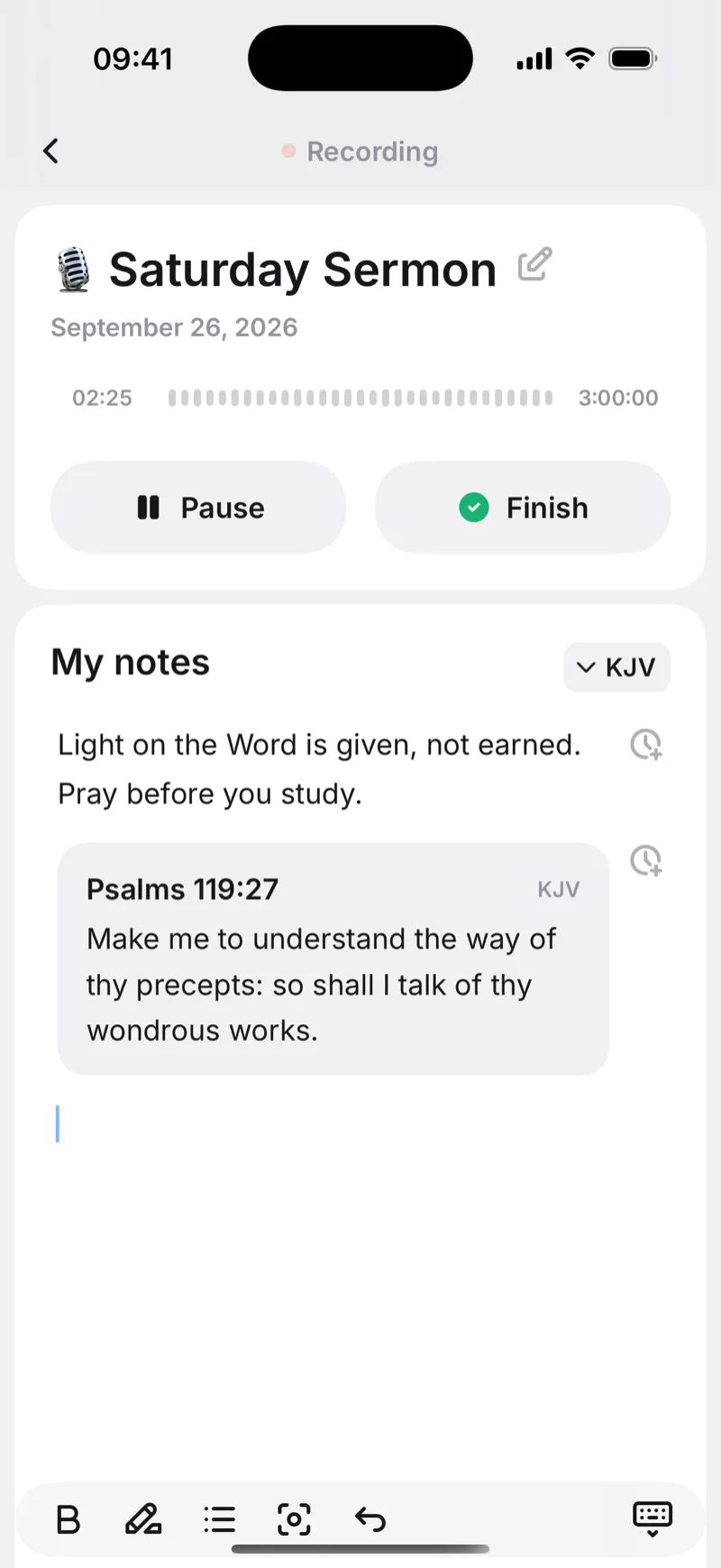
The difference shows up on Tuesday, not Sunday. With Voice Memos you have audio. With Sermon Keeper you have a searchable transcript, your own timestamped notes, and a summary you can skim in a minute.


6 tips for a clean recording
- Sit closer than feels necessary. Phone microphones are good, but they fall off fast with distance. A few rows forward, or beside a speaker, is the single biggest quality win.
- Use Airplane Mode. It stops calls and notifications from interrupting the audio, and it saves battery over a long service.
- Clear a little storage first. A 45-minute recording is only about 20 to 30 MB, but if your phone is completely full it can stop mid-sermon. Delete a few old videos and you're safe.
- Don't cover the microphone. On most iPhones it sits along the bottom edge, so resting the phone face-up on your lap or a Bible works better than gripping it.
- Start early. Hit record during the last song, not when the pastor is already three sentences in. You can always trim the front later.
- Let the phone's own microphone do the work. If AirPods or a car kit are connected, a phone will often route recording through them, and a headset microphone is built for phone calls, not for a voice forty feet away. Sermon Keeper records through the iPhone's own microphone even when something is paired over Bluetooth.
Common mistakes to avoid
- Recording from the back row. Distance muffles everything. If you're going to record, sit where the microphone can hear.
- Forgetting to check the church's stance. Ninety seconds of courtesy avoids an awkward conversation. See the legal guide if you're unsure.
- Letting recordings pile up untouched. A folder of 30 unnamed audio files helps no one. The value is in reviewing, not hoarding, which is the next section.
- Recording audio only when you wanted notes. If your real goal is to remember the message, plain audio makes you re-listen to the whole thing. Timestamped notes point you straight to what mattered.
After the service: turn the recording into something you'll use
A recording is raw material, not the finished thing, and two moves make it pay off. First, transcribe it so it becomes searchable text you can skim instead of scrub through. Second, review it within 24 hours, because a quick pass while the service is fresh does more for memory than a dozen re-listens later.
If you recorded with Sermon Keeper, both are already handled: the transcript, summary, and key points are waiting when the service ends. If you used Voice Memos, you can still run the file through an AI transcription app afterward.
Which method should you use?
If you just want a copy of the audio and nothing more, Voice Memos is free, already on your phone, and done in one tap. If your real goal is to remember and revisit the sermon, record with Sermon Keeper so you walk away with notes, a transcript, and a summary instead of a 45-minute file you'll never open. Still deciding on an app? Our roundup of the best sermon notes apps compares the options side by side.
Frequently asked questions
In most US states, yes. Recording a sermon for personal use is legal, since you're a participant in the service. A few states have stricter all-party consent rules, and every church can set its own policy, so it's courteous to ask a pastor or usher first.
Not with Voice Memos, which only captures audio. Sermon Keeper records the audio while you type or tap to drop timestamped notes, so each note links back to the exact moment in the sermon.
A voice recording is small, roughly 20 to 30 MB for a 45-minute sermon in Voice Memos. Free up a little space beforehand and you'll never run out mid-service.
You can run the audio through an AI transcription tool afterward, or record with Sermon Keeper, which transcribes it automatically and gives you a summary and key points within minutes.
Yes. Both Voice Memos and Sermon Keeper record locally with no signal needed. Sermon Keeper transcribes once you're back online, so you can record offline in the pew and process it later.